- Product

- Pricing
- Affiliate Program
- Developers
- Resource
 EN
EN
If you're new to Twitter, creating an account might seem like a bit of a challenge. But don't worry, in this guide, we'll cover the basics, including how to create an account for Twitter, and ensure you're set up in no time! So, if you're wondering how to create a Twitter account and get started, keep reading!

Before learning the process of getting an account created for Twitter, there are a few things you need to get prepared.
1. Email vs. Phone Number: How to Choose
If you prefer a more private sign-up process, an email address is your best choice. However, using your phone number can make account recovery simpler, especially when you forget your password or need additional security settings.
2. Age and Location Requirements
You must be at least 13 years old to create a Twitter account, and the platform may ask for your location to personalize your experience. Some countries, such as Iran and North Korea, either block access to the platform entirely or limit registration due to local laws and government policies. So please make sure you're aware of these requirements before proceeding.
3. Basic Equipment and Network Environment
For a smooth sign-up, please ensure you have a reliable Internet connection and access to a device like a smartphone, tablet, or PC. A stable network will prevent disruptions during the account creation process.
How to create the Twitter accounts? Now that you’re ready, let’s walk through the steps of creating a Twitter account. It’s a simple process that will only take a few minutes.
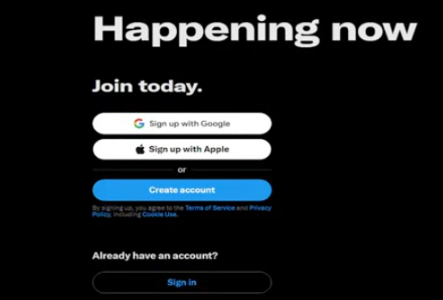
Step 1: Go to Twitter’s sign-up page on your device, and click "Create Account".
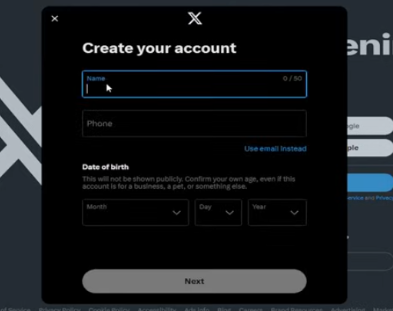
Step 2. In the pop-up window, add your name, phone number, and date of birth, then click "Next”.
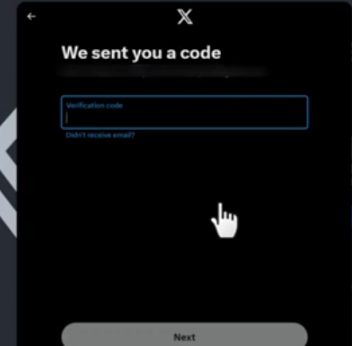
Step 3. Add the code that Twitter sent to you.
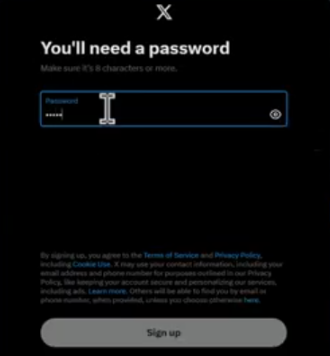
Step 4: Create a strong password and click "Sign up".
Step 5. Once you finish, you can start customizing your profile and exploring Twitter!
Step 6. Pick what you are interested in, such as News, Sports, Entertainment, and more.
When creating a Twitter account, you can use either your mobile device or a desktop computer, each offering a slightly different experience. Here’s a breakdown of the key points for both methods:
Mobile Registration Process:
1. Download and install the Twitter app from the App Store (iOS) or Google Play Store (Android).
2. Open the app and tap “Sign Up” to begin.
3. Provide your email or phone number, create a username, and set a password.
4. Check your email or phone for a verification code and enter it.
5. Upload a photo, write a bio, and select interests.
4. Follow people and start exploring your Twitter feed.
Desktop Registration Process:
1. Go to www.twitter.com on your computer.
2. Find the sign-up button and click it.
3. Enter your email or phone number, choose a username, and create a password.
4. Enter the verification code sent to your email or phone.
5. Add a photo, bio, and select interests to personalize your profile.
6. Start following accounts and interacting with tweets.
Differences and Suggestions:
Mobile registration is faster and more convenient if you're on the move, while the desktop version offers a larger screen for a more detailed setup. If you prefer a quick and portable setup, go with mobile. And if you’re setting up from home and want a larger view, choose the desktop version.
Once you've created your Twitter account, it's time to personalize and secure it. Here are some essential steps to take as a beginner:
1. Setting Your Profile Picture and Bio
Your profile picture and bio are key to creating a unique presence. Choose a clear, recognizable photo and write a bio that reflects your interests or personality. This helps others understand more about you.
2. Choose Your Interests and Follow Accounts
Twitter will prompt you to select your interests. This helps customize your feed with relevant content. You can also follow accounts based on your interests, whether that’s friends, celebrities, or influencers.
3. Basic Privacy and Security Settings
You can make your account private so only approved followers can see your tweets. Additionally, enable two-factor authentication for extra security. These settings help protect your account from unwanted activity.
Creating a Twitter account can sometimes come with a few hurdles. One of the most common issues is not receiving the verification code. This can happen if there’s a problem with your phone number or email address. Double-check that your contact information is correct and make sure you have a stable Internet connection.
Another frequent issue is encountering an unavailable username. If your chosen username is already taken, try variations, add numbers or symbols to make it unique.
In some cases, you might find that you’re temporarily restricted after registration. This can happen if Twitter detects unusual activity during the sign-up process. It's often resolved within 24 to 48 hours.
Lastly, verification failure can occur due to mismatched information or a problem with your contact details. So please ensure your email address and phone number are correctly linked to your account for a smooth verification process.
It’s important for users to follow some basic guidelines to avoid getting their accounts restricted. In the first few days, you need to avoid excessive actions like liking, retweeting, or following too many accounts in a short period. These behaviors can trigger Twitter's spam filters.
Besides, there are 3 more useful tips to avoid getting restricted.
Start slowly: Engage with a few posts each day and build your presence step by step.
Avoid unusual behavior: Don’t engage in spammy activities like mass following or using irrelevant hashtags.
Nurture your account gradually: Post original content, interact with users thoughtfully, and keep a consistent profile.
While it’s possible to create multiple Twitter accounts, there are a few important things beginners should know before you start it.
Twitter's Basic Attitude on Multiple Accounts
Twitter allows users to have more than one account, but they must adhere to Twitter's guidelines and rules. Accounts should not be used for spammy behaviors, such as automating posts or engaging in abusive actions. It's essential to manage each account separately and responsibly.
Common Misconceptions for Beginners
You may think that you need multiple accounts to follow different groups of people or tweet about various topics. However, it’s a misconception, for you can manage interests or different personas within a single account by using lists or managing privacy settings.
When Do You Need Multiple Accounts?
Multiple accounts are useful if you have distinct interests, like a personal account and a professional one, or if you want to manage a business, brand, or hobby separately. Just ensure you’re not violating Twitter's rules by creating accounts for harmful purposes.
Managing multiple Twitter accounts can be somewhat difficult, especially when it comes to keeping them safe from being flagged or restricted. One of the most important factors in avoiding issues is environmental isolation, so you need to ensure that each account operates independently without any overlap in activity. This means separating login sessions, actions like following or retweeting, and even device usage. By doing this, you can reduce the risk of Twitter block accounts mistakenly.
To help with this, anti-detect browsers like MoreLogin cloud phone can make managing multiple accounts much easier and safer. It allows you to create isolated browsing environments for each Twitter account, so you can log in to different profiles without worrying about mixing them up.
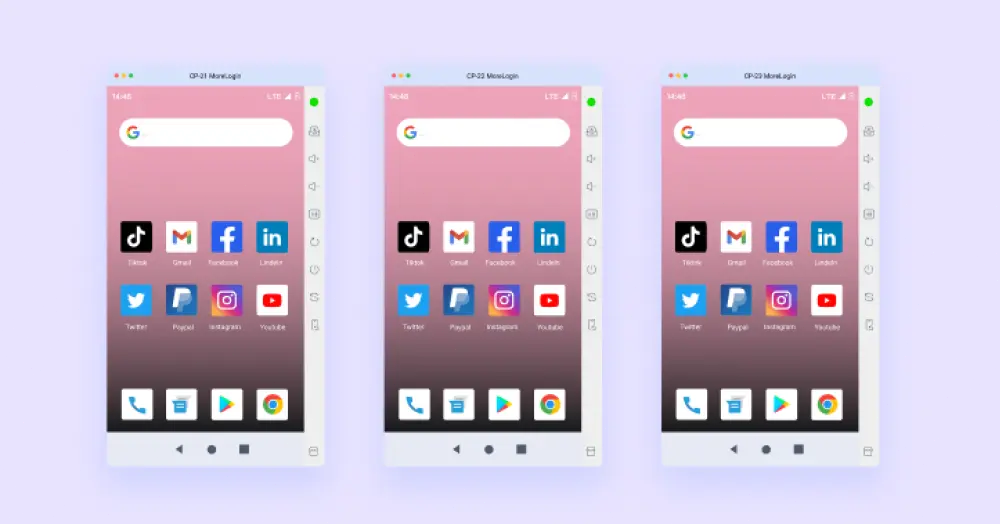
Additionally, MoreLogin Cloud Phone offers 2 free accounts, helping you separate your profiles and keep them secure. You can try to make your working process much easier than ever.
In summary, creating Twitter accounts in 2026 is simple but requires careful attention to privacy, security, and account activity. By following the tips above, like maintaining environmental isolation and avoiding spammy behavior, you can keep your accounts safe and prevent restrictions.
If you're handling multiple accounts, MoreLogin is an excellent tool to help you streamline the process with secure account management and separation. Whether you're a beginner or managing several profiles, MoreLogin can improve your efficiency and keep your Twitter experience smooth and hassle-free. Start using MoreLogin today!
1. How many Twitter accounts can one email address register?
You can only register one Twitter account per email address. If you want to create multiple accounts, you'll need to use different email addresses or phone numbers.
2. How long does it take for a new account to become stable?
Usually, a new Twitter account becomes stable within a few hours after registration. However, it might take up to 24 hours for your account to be fully verified and for all features to become accessible.
3. Can I try again immediately if registration fails?
Yes, if your registration fails, you can try again immediately. Just make sure the information you’re entering is correct, and ensure that any previous issues (like email verification) are resolved.
4. Can I change my username later?
Yes, you can change your username at any time. Just go to your account settings and update it as needed. However, be aware that your username must be unique and follow Twitter’s guidelines.

 EN
EN